
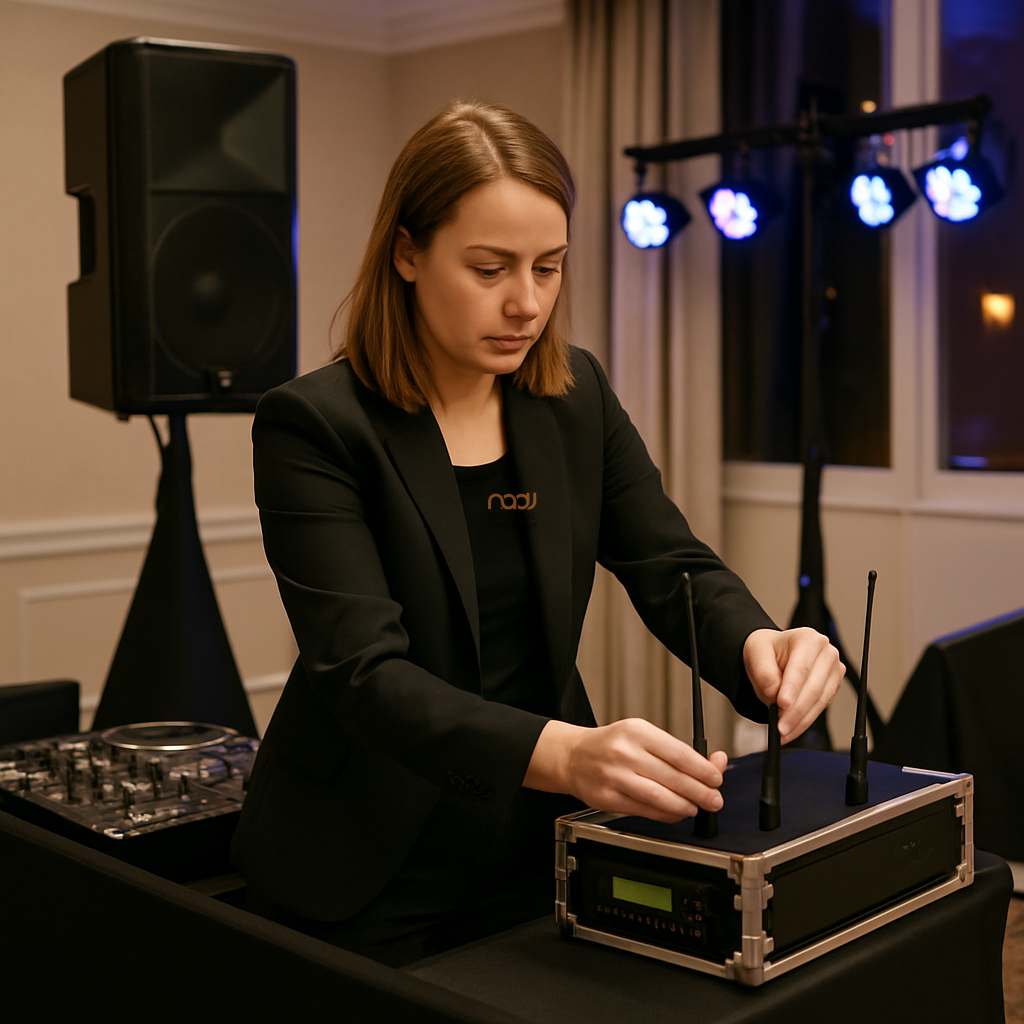
Good DJ radio mic antenna placement is one of the simplest ways to improve reliability, yet it is often overlooked until a dropout happens in front of guests. For mobile DJs working across the UK, a little planning at setup can reduce interference, improve range and make spoken announcements feel more professional. This matters whether you are working in a hotel function room in London, a village hall in the Midlands, or a busy events space in Manchester, Birmingham, Leeds, Bristol, Cardiff, Glasgow, Liverpool, Nottingham, Leicester or Coventry.
The good news is that you do not need a complex RF setup to make gains. In many cases, the best improvements come from basic positioning, sensible cable routing and a clearer understanding of what can block or distort your signal. Below, NADJ looks at the practical changes that working DJs can make straight away.
Why antenna placement matters
Radio microphones rely on a stable line of communication between the transmitter and receiver. If the receiver antennas are badly positioned, the signal can weaken when people move around the room, when the DJ booth is hidden behind metal truss or screens, or when the receiver is tucked into a rack under other equipment.
In practice, poor antenna placement can lead to reduced range, intermittent audio and those awkward moments when a speech or announcement cuts out. While no setup can eliminate every issue, careful placement can reduce the likelihood of problems significantly.
Start with the receiver location
Before worrying about the antennas themselves, look at where the receiver sits. A receiver placed low down behind a metal facade, inside a crowded case or next to a mass of power supplies is more likely to struggle than one in a clear, elevated position. If possible, keep it in open air with as few physical obstructions as possible between the antennas and the performance area.
For many mobile DJs, that means moving the receiver to the top of a rack, onto a shelf or into a position where it can “see” the room better. If you work from a booth cover or facade, test whether moving the receiver forward or outward makes a difference. Often, a small change in placement gives a noticeable improvement.
Keep antennas visible and separated
One of the most effective habits is to keep antennas as visible as practical. Antennas do not perform well when hidden behind large metal objects, packed cases or cabling that wraps around the receiver. They also benefit from separation. In many systems, antennas placed too close together can be less effective than when spaced according to the manufacturer’s guidance.
As a general rule, avoid letting antennas touch the DJ booth frame, lighting stand, or metal legs and brackets. Where a receiver includes removable antennas, consider whether relocating them to a better position on the booth or using an approved external mounting solution would help. Always follow the manufacturer’s recommendations for your exact model, as designs vary.
Avoid common signal blockers
Several everyday items can reduce reliability without you noticing at first. These include:
- large metal speakers or racks placed directly in front of the receiver
- LED screens, TV walls and metal structures around the booth
- flight cases stacked too tightly around the unit
- power distribution units and dense cable looms sitting alongside the antennas
- people crowding close to the receiver during speeches or prize draws
In larger venues, the issue may not be distance but obstruction. A radio mic can behave perfectly in an open setup and then become unreliable once surrounded by staging, décor or guests. That is why it helps to test the mic from the actual presentation position, not just from beside the booth.
Use extension placement wisely
If your receiver supports antenna extension, positioning can improve markedly. The aim is usually to get the antennas higher, clearer and more central to the room, while keeping them within the system’s recommended specification. This can be especially useful in larger hotels, marquees and conference spaces where the DJ is positioned at one end of the room and speaking is needed at the other.
However, it is important not to improvise with unsuitable cables or random adapters. Long or poor-quality runs can introduce losses and may undo the benefit of relocation. Use proper components intended for the system, and if you are unsure, check the manufacturer’s guidance or speak to a specialist supplier.
Match placement to the venue layout
Venue shape matters. A narrow room in Scotland may behave very differently from a wide ballroom in London or an open-plan venue in Bristol. Walls, balconies, mirrors, catering areas and even heavy guest traffic can change how RF behaves.
That is why the best antenna position is not always the same from one gig to the next. Think about where the audience will be, where speeches will happen and where you will stand when using the mic. If the speaker is likely to move across the room, position the receiver to give the clearest path across that likely movement area.
Do a proper soundcheck — and move if needed
A brief mic test from behind the booth is not enough. Walk the room, speak in the same way you would during the event and listen for noise, dropouts or weak spots. If you notice problems, do not assume the mic is faulty straight away. Try changing antenna position first, then retest.
When time allows, make antenna checks part of your standard setup. This is especially useful for weddings, corporate events and busy social nights where announcements matter. A few minutes spent positioning properly can save embarrassment later and help you deliver a more professional experience.
Keep the system maintained
Even the best placement will not compensate for damaged antennas, loose connections or tired equipment. Inspect sockets, mounts and cables regularly, and replace worn parts before they fail. If you carry multiple radio mic systems, label them clearly and note which antennas or accessories work best in which cases.
It is also wise to keep an eye on frequency use and local conditions. Wireless performance can be affected by a range of factors, including other equipment in the venue. For that reason, any advice on a website should be seen as general guidance rather than a substitute for checking the live setup on the night.
Practical takeaway for working DJs
For most mobile DJs, better DJ radio mic antenna placement comes down to a few simple habits: keep receivers clear, avoid metal obstructions, separate antennas sensibly, and test in the room before the event starts. Those steps can make a reliable system feel even more dependable.
If you are reviewing your wider rig, NADJ members may also find it useful to compare PA speaker options for mobile DJs, understand public liability insurance considerations, and check membership tiers. You can also use the NADJ directory and gig listings, or visit NADJ Hub and NADJ Media Ltd for services and support relevant to the trade.
As ever, check the specific instructions for your equipment and venue. Small changes, applied consistently, are often what separate an acceptable setup from a genuinely reliable one.
AI transparency note
NADJ uses artificial intelligence as an editorial assistant. Articles produced through this publisher begin with a human-selected idea, source, brief or editorial direction, and AI may be used to research, structure, draft or improve the wording. AI does not set NADJ editorial policy or operate free-range: people acting for NADJ set the instructions and publishing framework, monitor the output and retain editorial responsibility.
Images used by NADJ may include stock photography or AI-generated visuals where appropriate. NADJ is volunteer-led and editorial time is limited; much of our available time is currently absorbed by governance and management, a substantial data audit and membership-system transfer, and planning 12 Tea & Test days across the UK. You can help strengthen member-led content by sending article ideas or completed submissions to hello@nadj.org.uk.







 Avtar Thethy
 Fabio Capozzi
 Alastair Craig
 Dave Mills